
2024-07-24
Setting Up Nextcloud on a Raspberry Pi: Docker Compose, PostgreSQL, Traefik and Push Notifications
Setting Up Nextcloud on a Raspberry Pi: Docker Compose, PostgreSQL, Traefik and Push Notifications
Update (July 2026): two years later this stack looks quite different. The Traefik and port-forwarding edge described here was eventually replaced by a Cloudflare Tunnel with zero open ports. This post stays up as the record of the original build. The follow-up is From Port Forwarding to Cloudflare Tunnels.
A few days ago I wrote about why you might want a home server. This is the first concrete build on mine: Nextcloud on a Raspberry Pi, fully containerized. It has a proper database, caching, TLS certificates that renew themselves, and working push notifications, which most Docker setups skip.
Credit where it is due: two community guides shaped this setup. One is this Raspberry Pi guide on the Nextcloud forum. The other is wwe's excellent docker compose with notify_push walkthrough. What follows is my adaptation of both for an ARM64 Pi, plus the details that cost me evenings to figure out.
The stack at a glance
One Compose project, six containers, one job each:
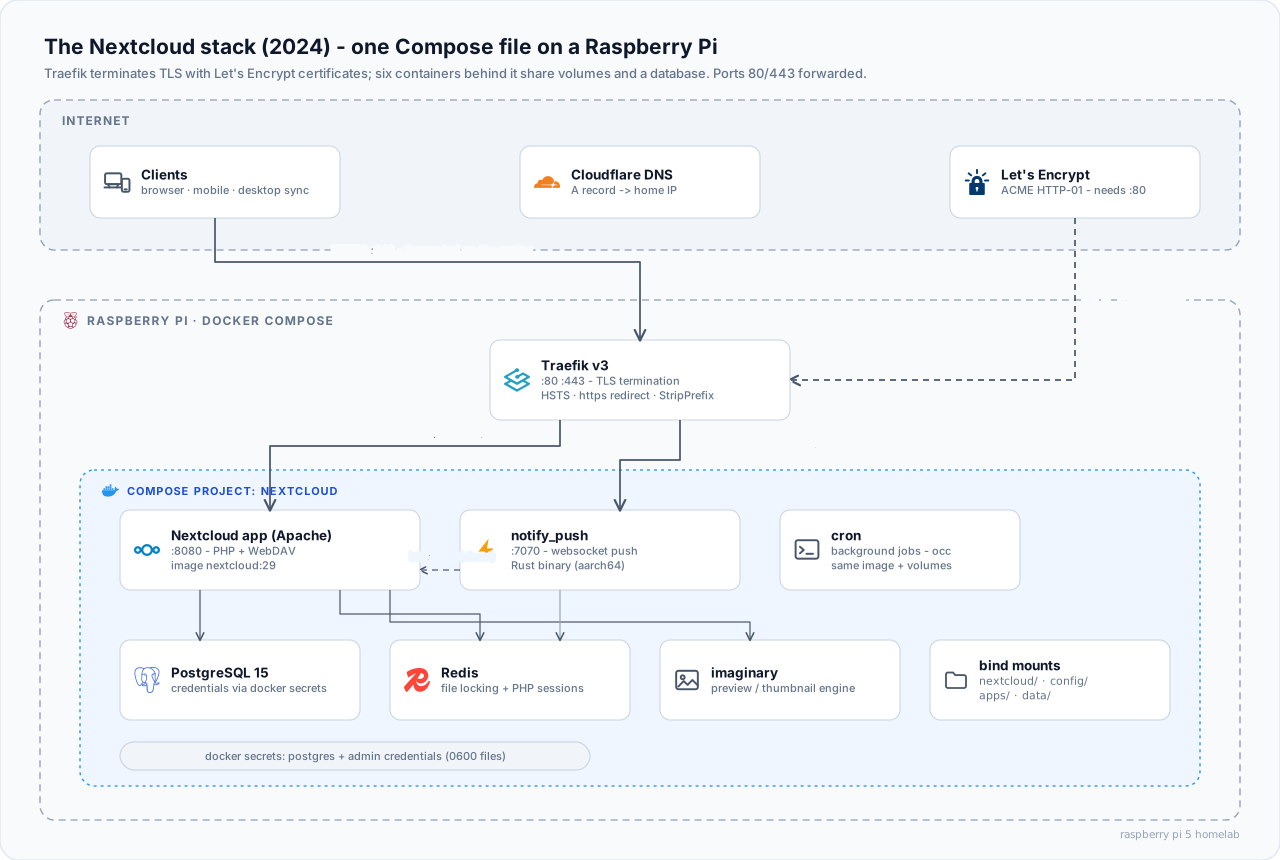
| Container | Role |
|---|---|
app |
Nextcloud itself (Apache image): PHP, WebDAV, the works |
cron |
Same image, different entrypoint: background jobs every 5 minutes |
notify_push |
The Client Push daemon for real-time sync without polling |
db |
PostgreSQL 15, faster than MariaDB in my testing and cleaner to upgrade |
redis |
File locking, caching, and PHP sessions |
imaginary |
Preview/thumbnail generation, so PHP does not choke on photos |
In front of all of it sits Traefik v3, terminating TLS with Let's Encrypt certificates. The router forwards ports 80 and 443 to the Pi. A Cloudflare A record points the domain at my (dynamic, sigh) home IP.
The interesting parts of the Compose file
The full file is long, so here are the pieces that carry the design. Postgres and the admin account get their credentials from Docker secrets: chmod 600 files on disk, never environment variables.
  db:
    image: postgres:15
    restart: unless-stopped
    volumes:
      - ./db:/var/lib/postgresql/data
    environment:
      - POSTGRES_DB_FILE=/run/secrets/postgres_db
      - POSTGRES_USER_FILE=/run/secrets/postgres_user
      - POSTGRES_PASSWORD_FILE=/run/secrets/postgres_password
    healthcheck:
      test: ["CMD-SHELL", "pg_isready -d $(cat /run/secrets/postgres_db) -U $(cat /run/secrets/postgres_user)"]
      start_period: 15s
      interval: 30s
    secrets:
      - postgres_db
      - postgres_password
      - postgres_user
The healthchecks are not decoration. The app container declares depends_on with condition: service_healthy. Nextcloud never starts against a database that is not actually accepting connections yet. That single line eliminates the classic "Internal Server Error on first boot" that fills the forum threads.
The app and cron containers share the same bind mounts (./nextcloud, ./config, ./apps, ./data). A single image upgrade moves both in lockstep.
notify_push, the part worth stealing
Without Client Push, every Nextcloud client polls the server on a timer. That is slow to react and wasteful on a Pi. The notify_push app ships a small Rust daemon. It holds a websocket open to every client and tells them the instant something changes. Getting it running in Compose is the part most guides skip. It is exactly what wwe's thread solves:
  notify_push:
    image: nextcloud:${NEXTCLOUD_VERSION}
    restart: unless-stopped
    depends_on:
      - app
    environment:
      - PORT=7070
      - NEXTCLOUD_URL=http://app   # talk to Nextcloud directly, not through the proxy
    entrypoint: /var/www/html/custom_apps/notify_push/bin/aarch64/notify_push /var/www/html/config/config.php
    volumes:
      - ./apps:/var/www/html/custom_apps
      - ./config:/var/www/html/config
Three details matter here:
- The binary path is architecture-specific. The app ships prebuilt binaries. On a Pi it is
bin/aarch64/notify_push. Thex86_64path from most examples fails with a cryptic "no such file" inside a container that plainly has files. NEXTCLOUD_URL=http://apppoints the daemon at the app container directly over the Docker network. Sending it through the public URL would add TLS + proxy hops for a loopback conversation.- It will crash-loop on first boot, and that is fine. The binary does not exist until the app is installed inside Nextcloud. The sequence is: bring the stack up, install the app, restart the service, then wire it up:
docker compose exec app php occ app:install notify_push
docker compose up -d notify_push
docker compose exec app php occ notify_push:setup https://nextcloud.example.com/push
The routing is the subtle bit. Clients reach the daemon on the same domain as Nextcloud, under /push. Traefik matches PathPrefix(/push) with a higher router priority than the main catch-all. It strips the prefix with a middleware and forwards to port 7070. Get the priority wrong and the main router swallows /push requests. Nothing errors. Push just silently does not work:
# traefik dynamic config
http:
  middlewares:
    nextcloud-redirect:
      redirectScheme:
        scheme: https
        permanent: true
    secHeaders:
      headers:
        stsSeconds: 31536000
        stsIncludeSubdomains: true
        stsPreload: true
    nextcloud_striprefix_push:
      stripPrefix:
        prefixes: ["/push"]
occ notify_push:self-test confirms the full chain. All checks green.
Small files, big debugging hours
- PHP sessions belong in Redis. The official image stores sessions on disk, which fights with multiple containers sharing the volume. A one-file fix mounted into the PHP config directory (context) points session storage at the
redisservice. Logins stop mysteriously expiring. - Apache needs
remoteiptold about the proxy. Behind Traefik, every request appears to come from the Docker bridge. A smallremoteip.confmounted into the container restores real client IPs. Without it, brute-force protection throttles the proxy instead of the attacker. - HSTS and the https redirect live in Traefik, not Nextcloud. The
secHeadersandredirectSchememiddlewares above handle them. Nextcloud's own security scan goes green once they are in place. - First boot takes minutes. The container reports "started" long before initialization finishes. Patience beats re-creating the stack because the login page is not up after thirty seconds.
The dynamic IP problem (a preview)
The one wart on this setup: my ISP rotates my public IP. The Cloudflare A record has to follow it. For now a small script on a systemd timer checks the public IP daily. It updates the DNS record through the Cloudflare API when it drifts, and resets Traefik's ACME storage so a fresh certificate gets issued. It works, but it is the part of the architecture I trust the least. The original guide teases a Cloudflare Zero Trust integration. I suspect that is the direction this server eventually heads.
For now though: files sync, calendars share, photos upload from the phone, previews render fast thanks to imaginary, and the desktop client updates the instant a file changes anywhere. For a credit-card-sized computer in a drawer, that is a very complete personal cloud.