
2026-07-10
From Port Forwarding to Cloudflare Tunnels: Evolving My Home Server
From Port Forwarding to Cloudflare Tunnels: Evolving My Home Server
Back in 2024 I wrote about why you might want a home server. This is the follow-up, two years and many lessons later. I tell it as two architectures. The first is the classic setup everybody builds: open ports, a reverse proxy, and a script fighting my ISP's dynamic IP. The second replaced it: a Cloudflare Tunnel with zero open ports.
Everything runs on a Raspberry Pi 5 in my house. By the end of this post you will see how requests travel from a phone on the other side of the world to a container on that Pi. No port is forwarded on my router. My home IP does not appear in any DNS record.
The platform today
| Component | Detail |
|---|---|
| Host | Raspberry Pi 5, 16 GB RAM, Ubuntu Server (aarch64) |
| Primary storage | 2 TB SSD, LUKS-encrypted: apps, databases, music |
| Bulk storage | 4.5 TB HDD, LUKS + LVM: photo/video library |
| Runtime | Docker Compose, one directory per stack |
| DNS + edge | Cloudflare: DNS, Tunnel, Zero Trust Access, DNSSEC |
Both drives unlock with a passphrase at boot (/etc/crypttab, with nofail so a missing disk never blocks booting). Each service is its own Compose stack:
/mnt/ssd/selfhost/
├── cloudflared/   # the edge: one outbound tunnel, all ingress rules
├── nextcloud/     # files, contacts, notes + Postgres + Redis + notify_push
├── navidrome/     # music server + Spotify sync pipeline
└── immich/        # photo backup (media on the HDD, DB on the SSD)
Every container that needs to be reachable joins one shared external Docker network called proxy. Who gets to talk to the outside world is the whole story of this post.
Architecture v1: Traefik, Let's Encrypt, and a script vs. my ISP
The first version followed the pattern in every self-hosting tutorial. Forward ports 80/443 on the router. Run a reverse proxy that terminates TLS with Let's Encrypt certificates. Point an A record at your public IP. I documented that first build in detail at the time, including the full Compose stack and Traefik config, in Setting up Nextcloud on a Raspberry Pi.
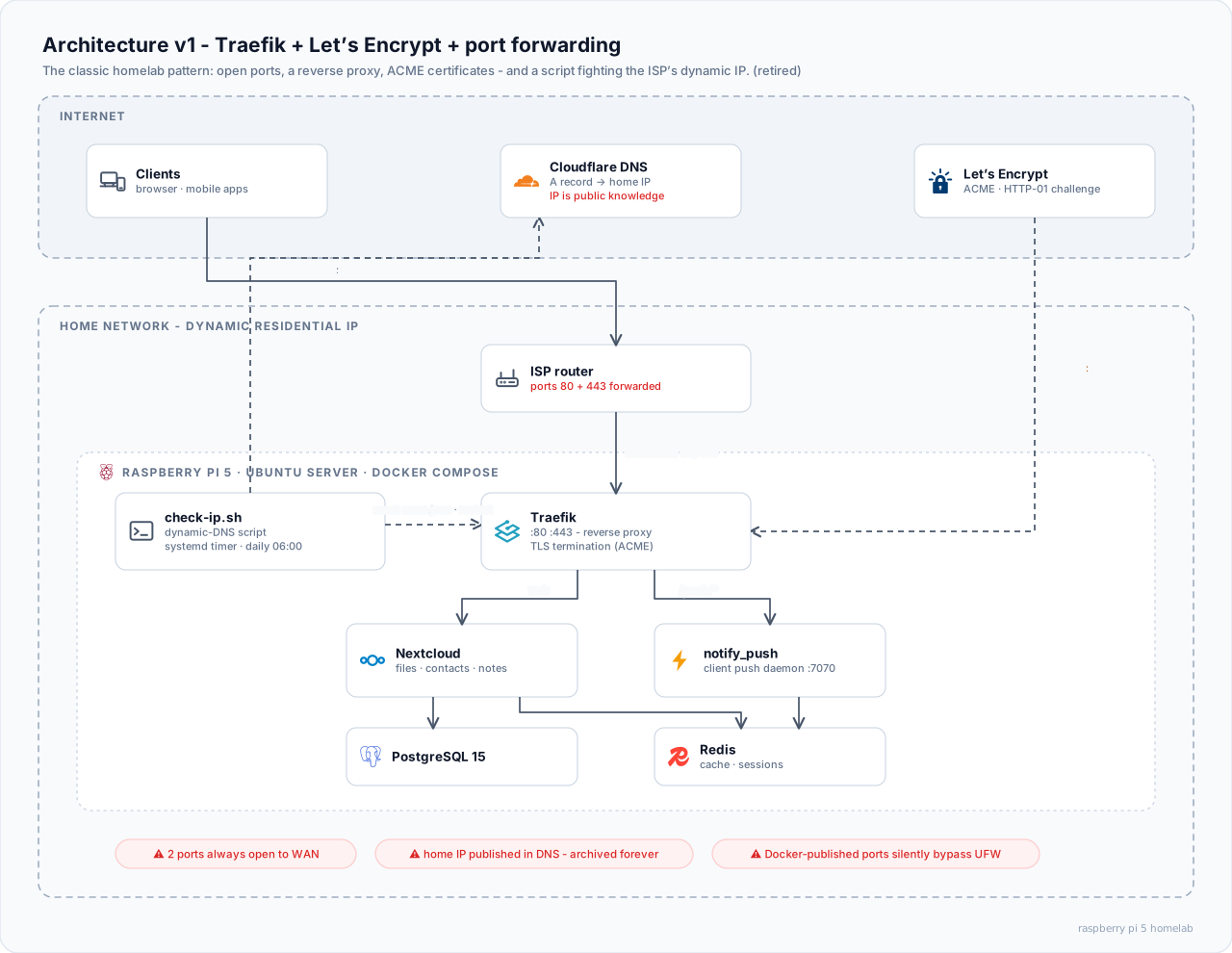
It worked. But every piece carried a hidden tax.
The dynamic IP problem
Residential connections do not come with a static IP. Mine changed whenever my ISP felt like it. Every change meant the A record pointed at a stranger's house until something fixed it. That something was check-ip.sh, a script on a daily systemd timer:
# 1. What IP does the world see?
CURRENT_IP=$(curl -sf https://api.ipify.org)

# 2. Same as last time? Then stop.
[[ "$CURRENT_IP" == "$(cat /var/cache/public-ip)" ]] && exit 0

# 3. It changed. Update the Cloudflare A record via API.
curl -sf -X PATCH \
  -H "Authorization: Bearer $CF_API_TOKEN" \
  --data "{\"content\": \"$CURRENT_IP\"}" \
  "https://api.cloudflare.com/client/v4/zones/$ZONE/dns_records/$RECORD"

# 4. Nuke Traefik's ACME state so it re-issues the certificate...
docker compose stop traefik
rm -f traefik/acme.json && touch traefik/acme.json && chmod 600 traefik/acme.json
docker compose up -d --force-recreate traefik

# 5. ...then wait 90 seconds and hope.
sleep 90
curl -sf -o /dev/null -w "%{http_code}" "https://$DOMAIN/login"
Step 5 is not a joke. The real script literally ended with a sleep 90 and an HTTPS health check that logged a warning if the certificate was not ready yet. Every IP change was a small outage with several failure modes chained together: the IP detection, the API call, the ACME re-issue, the proxy restart.
What else hurt
- Two ports permanently open to the internet. Ports 80 and 443 were a standing invitation on my router. That is a 24/7 attack surface pointed at my living room.
- My home IP was public knowledge. Anyone resolving
nextcloud.example.comgot my house's IP address. DNS history services archive those records forever. - ACME quirks. Traefik's
acme.jsonmust pre-exist as achmod 600file. Otherwise Docker creates it as a directory and certificate issuance fails in confusing ways. Renewals could race after IP changes. - The footgun I am most glad I discovered myself: published Docker ports bypass UFW. Docker inserts its iptables chains ahead of UFW's, so
ufw deny 8080does nothing for a container that publishes8080:80. My firewall rules gave me a false sense of security. The router's port forwards were the only real gate.
None of these problems is exotic. They are the default experience of self-hosting the classic way. That is why the fix felt so clean.
Architecture v2: inverting the connection
A Cloudflare Tunnel flips the whole model on its head. Instead of the internet connecting in to my house, a single lightweight container (cloudflared) dials out to Cloudflare's edge. It keeps a handful of redundant QUIC connections alive. Inbound traffic rides those already-established connections back. Nothing listens on the WAN. The router forwards nothing. My home IP appears in no DNS record. The public hostnames resolve to Cloudflare's anycast network.
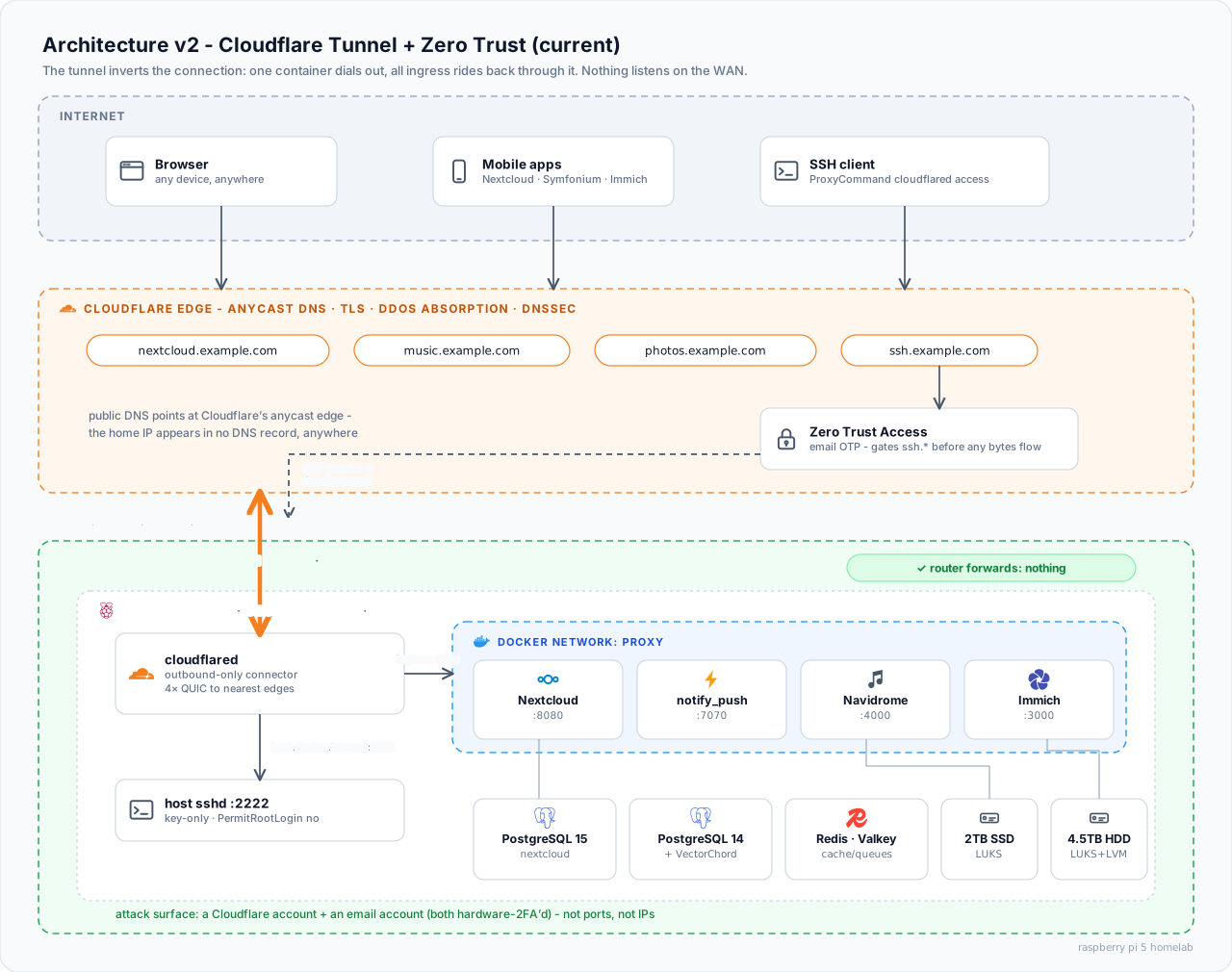
The entire edge of my infrastructure is now this Compose file:
services:
  cloudflared:
    image: cloudflare/cloudflared:latest
    container_name: cloudflared
    restart: unless-stopped
    command: tunnel --no-autoupdate run
    environment:
      - TUNNEL_TOKEN=${CF_TUNNEL_TOKEN}
    extra_hosts:
      # lets the tunnel reach services on the Pi host itself (sshd)
      - host.docker.internal:host-gateway
    networks:
      - proxy

networks:
  proxy:
    external: true
That is it. No published ports anywhere in the whole platform.
Routing: one tunnel, many services
Traffic rules live in the Cloudflare Zero Trust dashboard as ingress rules. Each rule maps hostname (and optional path) to an origin service. Rules are evaluated top-down. First match wins:
| Hostname | Path | Origin |
|---|---|---|
| nextcloud.example.com | /push/* |
notify_push:7070 |
| nextcloud.example.com | * |
nextcloud-app:8080 |
| music.example.com | * |
navidrome:4000 |
| photos.example.com | * |
immich_server:3000 |
| ssh.example.com | - | host.docker.internal:2222 (SSH) |
Ordering matters. The /push/* rule must sit above the catch-all for the same hostname. Otherwise Nextcloud's push daemon silently breaks. The origins are plain Docker DNS names on the proxy network. cloudflared resolves them like any other container would.
Adding a new service is now a two-step operation: join the proxy network, add one ingress rule. No ports, no certificates, no DNS records to manage. The dashboard creates the CNAME for you, and TLS is handled at Cloudflare's edge.
SSH from anywhere, gated by Zero Trust
The ssh.example.com route is special. It is protected by Cloudflare Access, which demands an email one-time-passcode before a single byte reaches my network. On the client side it is transparent after the first login:
# ~/.ssh/config
Host pi
  HostName ssh.example.com
  User pi
  ProxyCommand cloudflared access ssh --hostname %h
The first ssh pi pops a browser for the OTP. After that it feels like plain SSH. Access can even render a full SSH terminal in the browser for machines where I cannot install anything. Behind all that, the Pi's sshd still enforces PasswordAuthentication no and PermitRootLogin no. Access is a gate in front of the usual defenses, not a replacement.
What the attacker sees now
This is my favorite part of the redesign. Walk the chain from the outside:
- Resolve any of my hostnames → you get Cloudflare's anycast edge, never my house.
- Port-scan my home IP (if you somehow find it) → nothing is listening.
- Want a shell? You must get past Cloudflare Access (an OTP sent to a hardware-2FA-protected mailbox), then past key-only sshd.
The crown jewels stopped being ports and IP addresses. They became two accounts, Cloudflare and email, both protected with hardware 2FA. DNSSEC signs the zone on top. The old dynamic-DNS script, with its embedded API token? Deleted, token revoked. There is nothing left for it to do.
The honest trade-offs
No architecture is free. It would be dishonest to sell this one as such:
- Cloudflare terminates TLS at its edge. Cloudflare can see the plaintext of my traffic. For my threat model (protecting a personal cloud from the open internet) that is acceptable. For yours it might not be.
- The free plan caps upload bodies at ~100 MB. Backing up long phone videos through the tunnel fails. Those ride a LAN or VPN path instead.
- It is a dependency. If Cloudflare has a bad day, my services are unreachable from outside. LAN access keeps working.
I will take those trade-offs over open ports and a sleep 90 in a cron script every day of the week.
Operational notes that earned their place
- The
cloudflaredimage is distroless. There is no shell inside to debug from. When I need to poke at the network from the tunnel's point of view, I run a throwawaycurlimages/curlcontainer on theproxynetwork. - Nightly automation runs on systemd timers with
Persistent=true. Jobs missed during downtime catch up after boot instead of silently skipping a day. - The old rule stands even without port forwards: do not publish container ports you do not need. Docker's iptables rules bypass UFW, so the only safe published port is the one that does not exist.
What is next in this series
The platform this edge design serves is its own set of stories:
- A self-hosted Spotify: Navidrome plus a sync pipeline that mirrors my Spotify library through rate limits and all → read it here.
- Migrating Immich by carrying a hard drive across the room (and the Nextcloud storage lessons that preceded it) → read it here.
All three architecture diagrams in this series were drawn for it. The editable draw.io source is here if you want to adapt them for your own setup.