
2026-07-10
A Self-Hosted Spotify: Navidrome, spotdl, and a War with Rate Limits
A Self-Hosted Spotify: Navidrome, spotdl, and a War with Rate Limits
This is part of my home server series. The goal was simple to state and surprisingly deep to execute: make my entire Spotify library, liked songs and all playlists included, exist as plain audio files on my Raspberry Pi. Navidrome serves them so any Subsonic-compatible phone app can stream from anywhere.
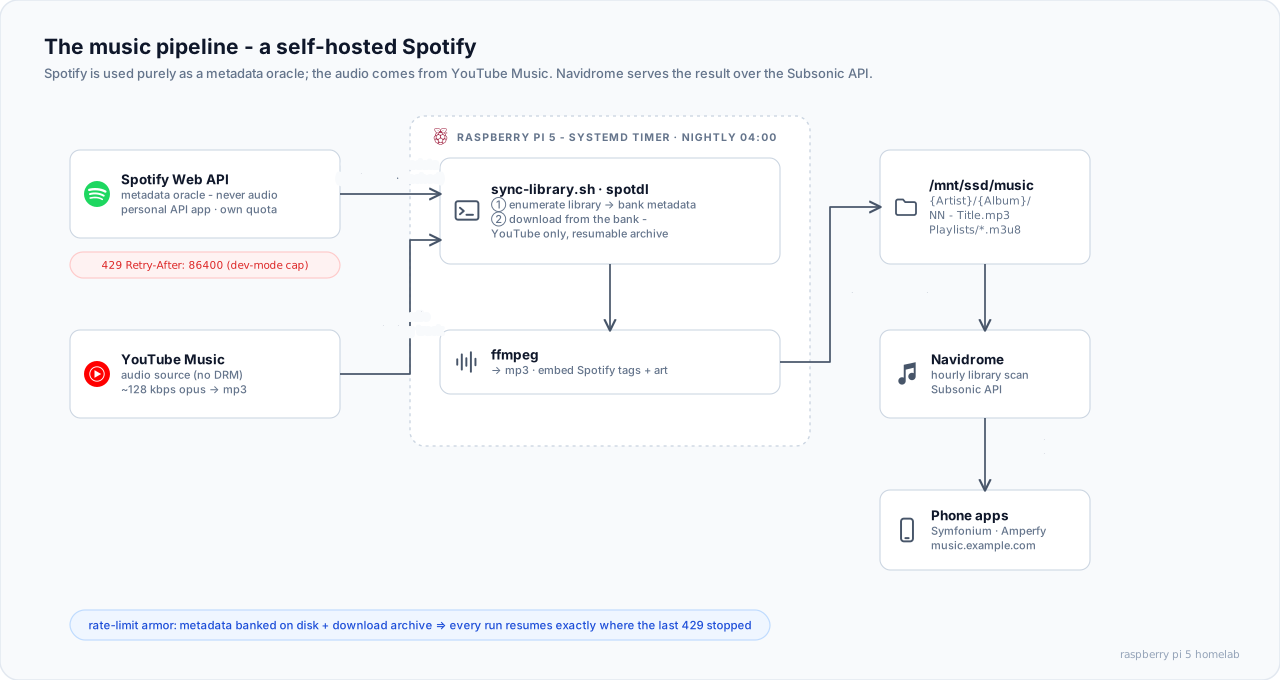
The key insight: Spotify is a metadata oracle, not an audio source
spotdl never touches Spotify's audio. That is DRM-protected. Spotify is used purely as a metadata oracle: which tracks, which albums, what artwork, what track numbers. The audio itself comes from YouTube Music. It streams without DRM, matched per track by searching "artist title album". The ceiling is YouTube Music's ~128 kbps opus (converted to mp3). That is fine on phone speakers and commutes. It is not an archival format.
Navidrome's side of the bargain is beautifully boring. It watches a folder. Files appear as {Artist}/{Album}/{NN} - {Title}.mp3. An hourly scan picks them up. Dozens of mobile apps that speak the Subsonic API (Symfonium, Tempo, Amperfy...) stream them through the Cloudflare Tunnel:
services:
  navidrome:
    image: deluan/navidrome:latest
    user: "1000:1000"
    environment:
      ND_SCANNER_SCHEDULE: 1h
      ND_BASEURL: https://music.example.com
      ND_PLAYLISTSPATH: Playlists   # import ./Playlists/*.m3u8
    volumes:
      - ./data:/data
      - /mnt/ssd/music:/music:ro    # read-only: Navidrome serves, never writes
    networks:
      - proxy
What the rate limiter taught me
The naive approach, feeding spotdl a list of track URLs, died fast. Every raw URL forces a per-track metadata lookup. ~2,900 of those in bulk is exactly what Spotify's anti-abuse systems exist to stop. Lessons, in the order they cost me time:
- Do not use spotdl's shared client ID. It is throttled into uselessness by everyone else using it. A personal (free) Spotify developer app gets its own quota.
- Even your own app has a daily cap while in "development mode". Exceed it and Spotify answers
429 Retry-After: 86400. Come back in a full day. - Concurrency trips a different tripwire. Four parallel threads hammering the session endpoint got the IP soft-banned (
Could not get session). That error means throttled, not broken. The fix is patience, not upgrading packages.
The design that survived is a two-step pipeline that touches Spotify as little as possible:
Step 1: enumerate and bank. A small Python script paginates my liked songs and playlists through the official Web API. Those endpoints return full track objects. The same pass that lists the library also banks every track's metadata into a library.spotdl file on disk. A few dozen gentle, spaced-out calls. That is Spotify's entire involvement.
Step 2: download from the bank. spotdl download library.spotdl reads metadata from disk and only talks to YouTube. With --archive, every completed track is recorded. Re-runs skip everything already done and fetch only what is new.
# Step 1: paginated enumeration, metadata banked to disk (the ONLY Spotify contact)
build-manifest.py  →  backfill/library.spotdl

# Step 2: downloads read the bank (YouTube only, fully resumable)
spotdl download library.spotdl --archive archive \
  --output "{artist}/{album}/{track-number} - {title}.{output-ext}"
The consequence of banking metadata on disk: a rate-limit block stops progress, never destroys it. Each nightly run (systemd timer, 04:00) resumes exactly where the previous one stopped, until the mirror is complete.
The backfill: 2,906 tracks without getting banned
The initial bulk download deserved paranoia. The failing request was not per-track. It was the session fetch that happens once per spotdl invocation. The loop was built around that:
- Chunks of 30 tracks per invocation, single-threaded, with a jittered 12-20 s pause between chunks.
- A canary first: one track per invocation for the first ~100 tracks, to prove the throttle had lifted before committing to the real run.
- Two-layer resume: a
cursor(the next line in the manifest, advanced only on clean exits) plus spotdl's--archive(the source of truth for "done"). Either one alone can be wrong. Together a crash costs nothing. - Backoff, not hard-stop: a failed chunk retries with escalating waits (5 minutes × attempt, capped at an hour) and gives up only after six consecutive failures.
The full run took about 13 hours on the Pi and finished with ~95% of the library downloaded. Retrying the stragglers recovered most of the rest. The final ~89 tracks simply have no YouTube source. That is the honest cost of this approach.
My favorite bug from that week had nothing to do with Spotify. The run stalled because run.log had been pre-created by root. The unprivileged >> run.log redirect failed. Bash reported the command as failed. The loop dutifully interpreted that as rate-limiting and backed off for 25 minutes at a time, downloading nothing. If you script long-running jobs: exit codes lie when redirects fail.
Rebuilding the playlists
Downloading files loses the thing that makes a library feel like yours: playlist membership. Rebuilding it needed a reliable mapping from "track in Spotify playlist" to "file on disk". The trick: while downloading, spotdl embeds the source Spotify URL in each file's ID3 WOAS frame (with the ISRC as a fallback key). A script re-reads playlist membership from the API. It maps each track to its file via that tag and writes one .m3u8 per playlist, plus a synthetic "Liked Songs" playlist, into the folder Navidrome imports from (ND_PLAYLISTSPATH).
Assorted findings from the trenches:
- The Web API cannot see playlist folders. The internal endpoint that has them answers
403to normal OAuth tokens. A first-party web-player token (borrowed from the browser's DevTools) can fetch it. Folder names become display prefixes likeT0P / rap. - Navidrome reads a playlist's
#PLAYLIST:name only on first import. It does not auto-prune a playlist when its.m3ufile disappears. Renaming or removing one properly means a manual database prune. spotdl sync(the ongoing mode, as opposed to the backfill) is a true mirror. It deletes local files whose tracks were removed from the source playlist. Know that before you point it at a folder you care about.
Was it worth it?
Entirely. The nightly timer keeps the mirror fresh. Playlists refill themselves as stragglers get retried. My phone streams my own library from my own hardware through my own tunnel. Spotify is reduced to the role it is genuinely best at: knowing what music I like.
Next in the series: migrating Immich and the Nextcloud storage lessons that preceded it.